Audit-ready by design

Release management that earns its signatures

Documentation matrices, role-separated approvals, electronic signatures, and append-only audit trails — so every deployment is controlled, traceable, and compliant.

21 CFR Part 11 ready GxP compliant Separation of duties

Last updated October 2026

File fingerprint verified
RELEASE · RG-2026.4 · DEVICE CONFIGURATOR
Change Request
CR-10428 · v2.1
Approved
System Design Specification
SDS-771 · v1.4
In Review
IQ Protocol
Awaiting applicability decision
Decision
User Manual
UM-220 · not yet started
Locked
Stage gate · Ready for VAL 66%
Signed by QA Approver
9
Release stages
3
Matrix change approvers
8
Role types supported
100%
Audit-trailed actions
Capabilities

Everything you need for controlled releases

From documentation matrices to production sign-off, ReleaseGuard covers the full lifecycle — without letting anyone skip a gate.

Access & Sign-in

Provisioned accounts only — no self-registration. Lockout after five failed attempts, forced password changes, and 30-minute session expiry.

Documentation Matrices

Define required, conditional, and not-applicable documents per release type. Import and export Excel workbooks; every change is versioned and QA-approved.

Separation of Duties

Authors, reviewers, and QA approvers for a document must be three different people. Role membership alone never grants document access.

Stage-Gated Releases

Planning through Released, with DEV, VAL, and PROD gates. The document gate is re-checked at every promotion action.

File Integrity

Every upload is fingerprinted with SHA-256. Review and approval are refused if the file changed after submission.

Audit Trail & Dossiers

Append-only audit records with CSV/PDF export. Release dossiers bundle approved revisions, the signature manifest, and checksums.

Trusted in regulated environments

Built for teams that answer to auditors

Deployed across pharma, medtech, and regulated SaaS — where every signature has to hold up.

21 CFR Part 11 aligned GxP principles ALCOA+ data integrity Audit-ready by design
RG
"We built ReleaseGuard because we watched too many regulated teams ship great software, only to scramble for three days before a gate because a signature was lost in an email thread. We believe release management shouldn't require a six-month QMS implementation. It should just mean your documentation gate works, your signatures are valid, and your audit trail is bulletproof. That's what this platform does."
Founder & CEO ReleaseGuard
Product Tour

See ReleaseGuard in action

Real screens from a live release — dashboards, documentation matrices, and rule-level configuration.
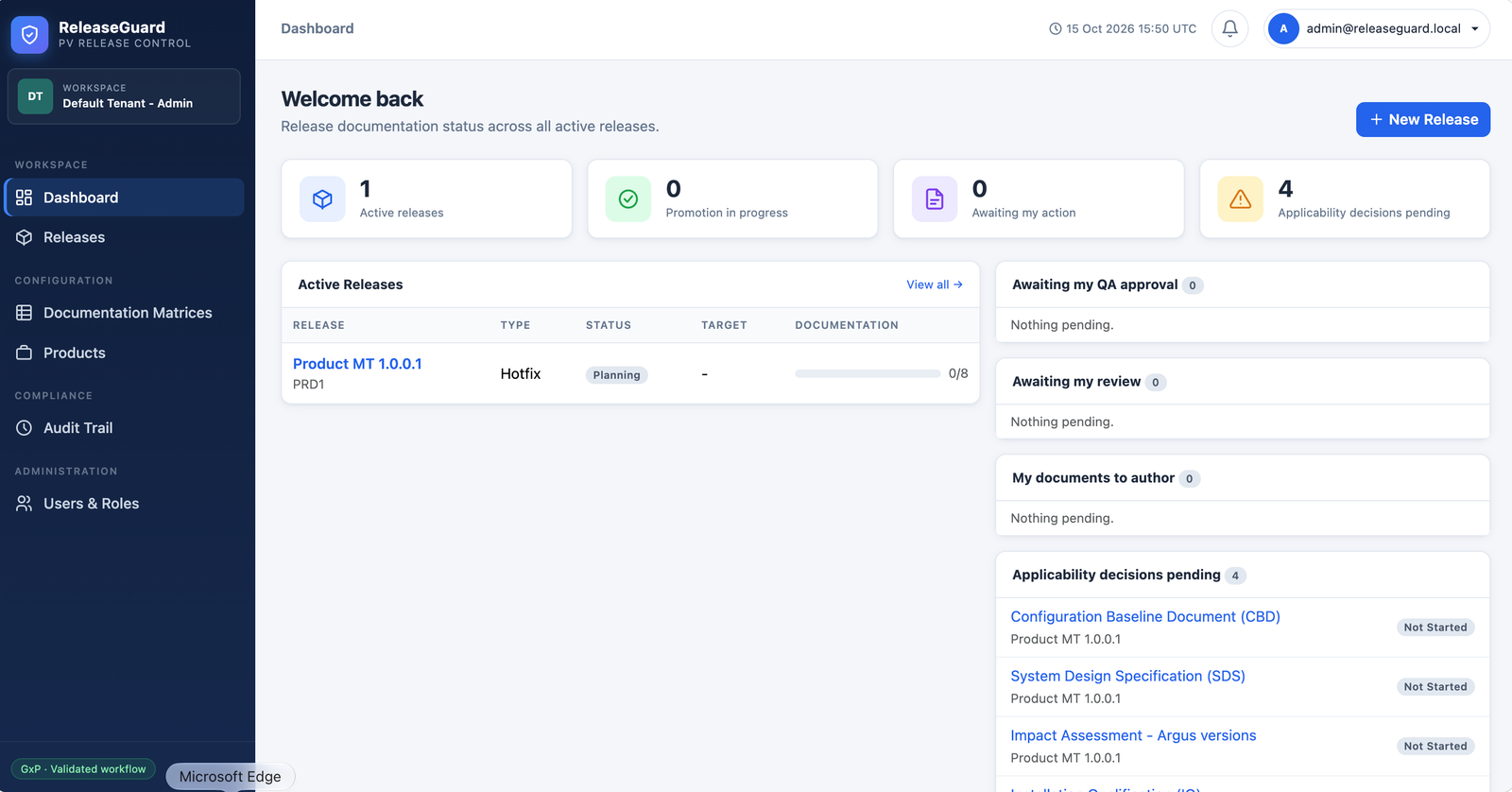
releaseguard.local/dashboard
ReleaseGuard dashboard showing active releases, promotion progress, pending applicability decisions, and QA approval queues
Dashboard Active releases, work assigned to you, pending applicability decisions, and the approvals relevant to your roles — all on one screen.
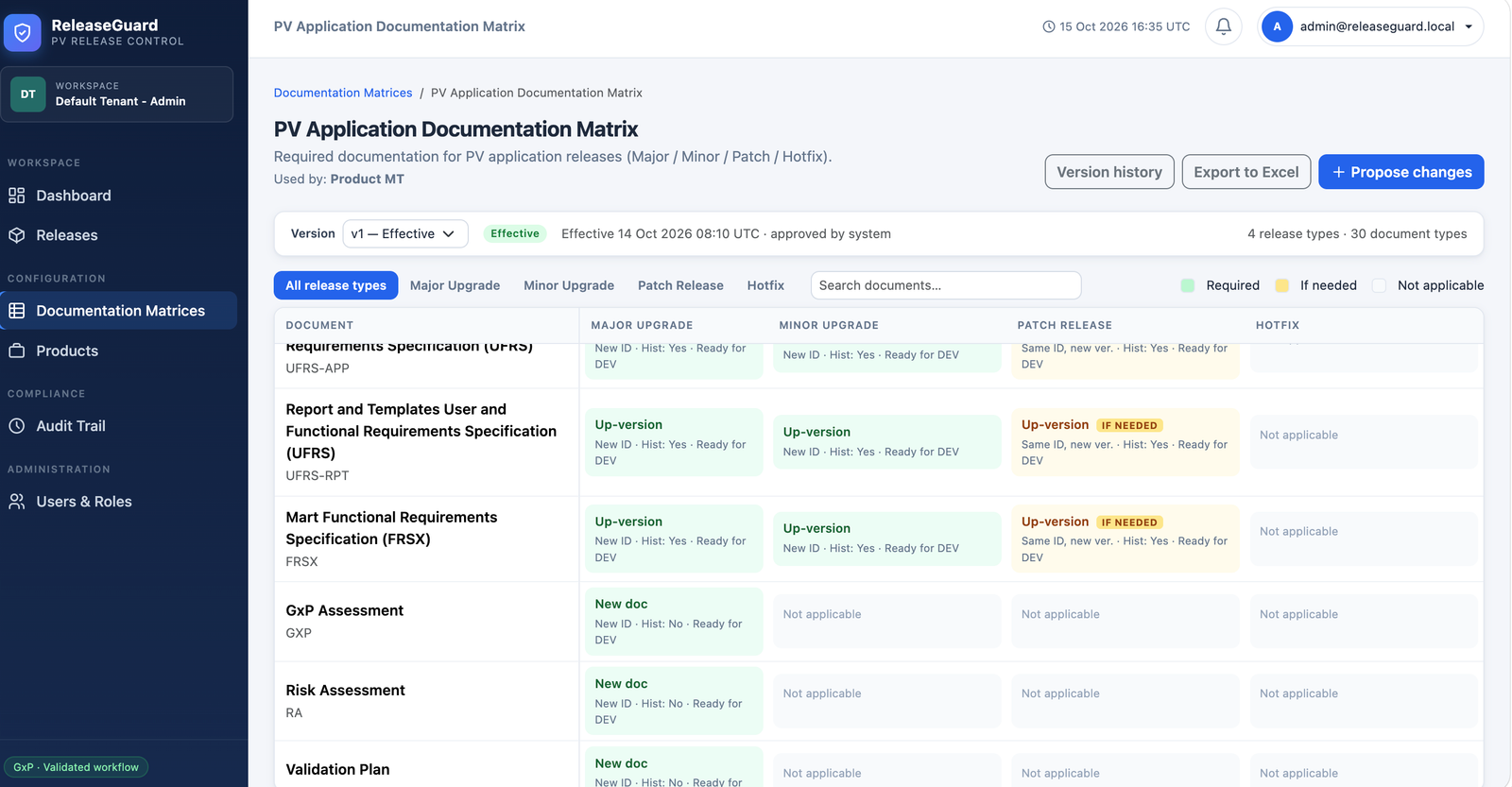
releaseguard.local/matrices/pv-app
PV Application Documentation Matrix showing required, conditional, and not-applicable documents per release type
Documentation Matrices Required, conditional, and not-applicable documents per release type — versioned, QA-approved, and exportable to Excel.
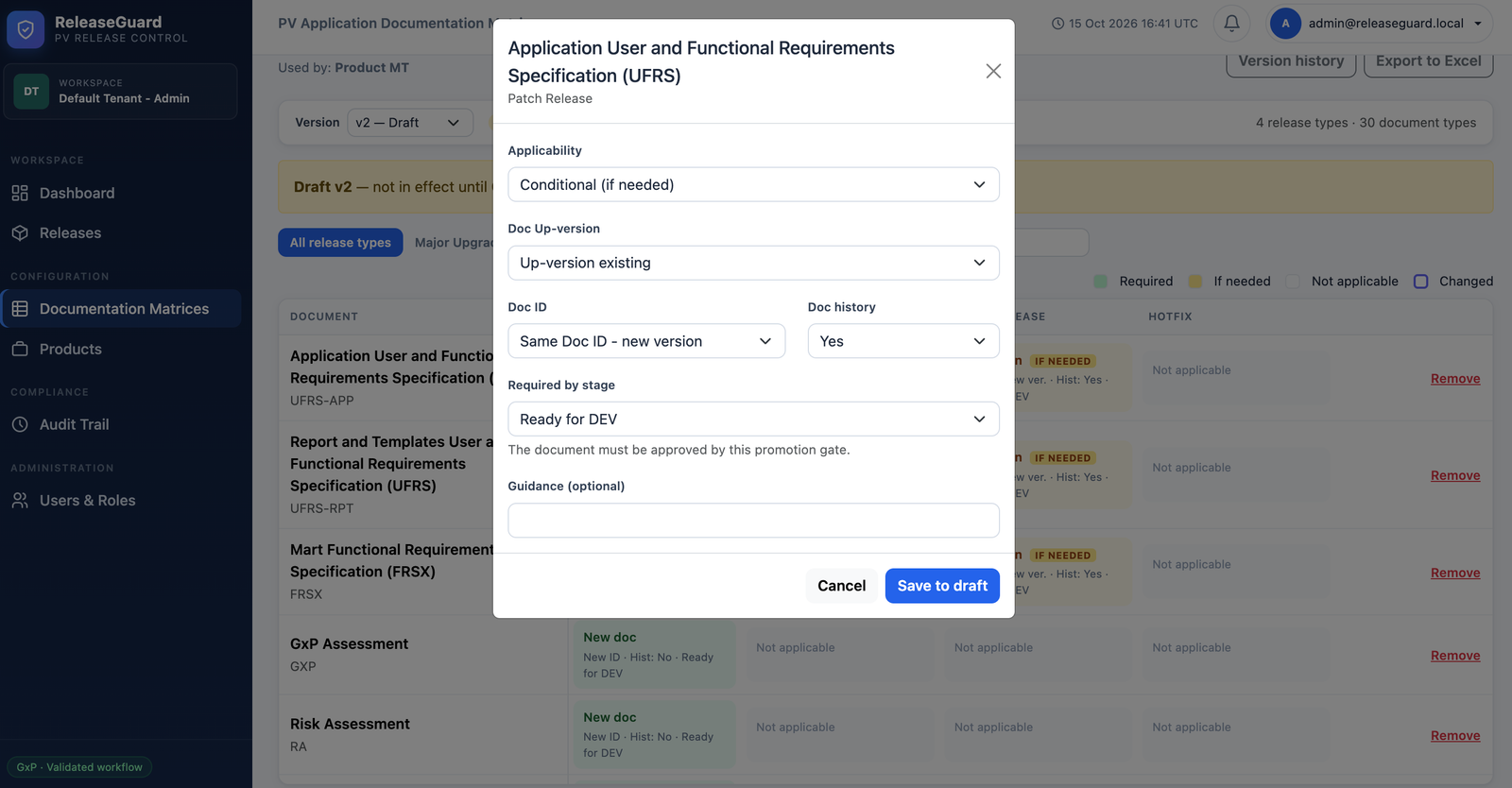
releaseguard.local/matrices/pv-app · edit rule
ReleaseGuard rule configuration dialog setting applicability, up-versioning behaviour, document ID rule, history requirement, and required-by-stage gate
Rule configuration Fine-grained control per document and release type — applicability, up-versioning behaviour, ID and history rules, and the stage gate that must approve it.
Access model

Roles & Responsibilities

A user can hold more than one role. A role permits an action — but document workflow actions also require assignment to that document.

RoleMain responsibilities
AdministratorManage users and roles; create and edit documentation matrices; request a product's matrix change.
ReleaseManagerManage products and releases, assign people, decide applicability, record manual deployments, and sign release-stage readiness.
AuthorMaintain document metadata and files, then submit assigned documents for review.
ReviewerReview or reject assigned documents.
QAApproverApprove or reject reviewed documents, approve matrix versions and DEV/VAL/PROD stage gates, and authorize releases.
ManagerProvide one of the required product-matrix-change approvals.
QualityManagerProvide one of the required product-matrix-change approvals.
ProductOwnerProvide one of the required product-matrix-change approvals.
Document lifecycle

A document's status is never set by hand

Every transition is a recorded action with the responsible user, a meaning, and an electronic signature.

1
Decision Pending
2
Not Started
3
Draft
4
In Review
5
Reviewed
6
Approved
Current state Responsible user Action & result
Decision pending ReleaseManager or Administrator Record Needed or Not needed with a justification and electronic signature. Not needed becomes Not Required and counts as complete.
Not Started Assigned Author or ReleaseManager Enter document ID/version and upload a file; the document becomes Draft.
Draft or Rejected Assigned Author Correct metadata or upload a revision, then sign Submit; the document becomes In Review.
In Review Assigned Reviewer Sign Review to move it to Reviewed, or Reject with a reason to return it to the author.
Reviewed Assigned QAApprover Sign Approve to move it to Approved, or Reject with a reason.
Approved ReleaseManager or QAApprover Reopen with a reason; the document returns to Draft. A release in a promotion stage returns to In Progress.
Configuration

Documentation Matrices

A matrix defines the documents and rules used to create a release checklist. Products bind to an effective matrix version.

Matrix rule types

  • Required — the document must be approved by its assigned stage gate.
  • Conditional — an applicability decision must be recorded by the gate.
  • Not applicable — excluded from the release checklist entirely.
  • ID/version behaviour — same-ID rule retains the previous ID with a new version; new-ID rule requires a different ID.
  • History required — the document's history record must be updated.

Default document gates

  • Ready for DEV — change request, requirements, GxP and risk assessments, regulatory and impact assessments, validation plan.
  • Ready for VAL — configuration baseline, system design specification, test plan, code review checklist, unit testing, qualification plan, traceability matrices, IQ, OQ.
  • Ready for PROD — summary reports, environment release notices, release notes, user manual, administrator guide.
  • Note — SDS, IQ, and OQ are not DEV-entry blockers, but must be approved by the Ready for VAL gate.
A matrix needs at least one release type and one document type before it can be submitted for QA approval. Approved versions become effective and the prior version is superseded.
Common questions

Answers to what regulated teams ask first

Short, direct answers — the same ones our team gives on demo calls.

01 Do we need to change our existing release process?
No. ReleaseGuard is designed to map onto the process you already follow. Your documentation matrix is a direct translation of the checklist your team uses today — with the added benefit that it's versioned, QA-approved, and enforced automatically. Most teams are running their first release in ReleaseGuard within a week of provisioning accounts.
02 How does ReleaseGuard support 21 CFR Part 11 compliance?
Three ways. First, every approval-type action requires password re-entry with a recorded meaning — that's an electronic signature under §11.50 and §11.100. Second, records are append-only: database triggers refuse updates or deletes on the audit trail and signature table. Third, every file revision is fingerprinted with SHA-256, and review or approval is refused if the file changes after submission.
03 Can we import our existing documentation matrix?
Yes. Download the blank Excel template from New Documentation Matrix, fill it in, and import it — the workbook is validated before any change is applied. Older three-column workbooks are also accepted and use QA-recommended defaults for document names. You can also copy an existing matrix as a starting point for a new one.
04 What happens if a document is no longer needed mid-release?
Conditional documents get an explicit applicability decision — Needed or Not needed — with a justification and electronic signature. Choosing "Not needed" moves the document to Not Required, which counts as complete. The decision itself is audit-trailed, so you can prove who decided, when, and why.
05 How is file integrity verified?
Every uploaded file is fingerprinted with SHA-256 at the moment of upload. When a reviewer or QA approver takes action, the current file's fingerprint must match the one captured at submission. If it doesn't, the action is refused and the document returns to the author to re-submit the corrected revision. This prevents silent post-submission edits.
06 Can one person have multiple roles?
Yes — a user can hold more than one role, and role membership is checked at every action. However, the author, reviewer, and QA approver for a single document must always be three different people, and the same person cannot provide multiple approvals for a matrix change request. Separation of duties is enforced by design, not policy.
Lifecycle

Nine stages, three hard gates

Deployments happen manually outside ReleaseGuard. The responsible Release Manager records the reference and evidence in a signed action.

Planning

Review the checklist and assignments. Documents cannot be submitted yet.

In Progress

A Release Manager starts the release. Assigned authors can submit documents.

Ready for DEV Gate

Release Manager signs after all documents due by the DEV gate are approved and each conditional document has an applicability decision.

DEV Deployed

Release Manager records the manual development deployment reference and evidence.

Ready for VAL Gate

A QA Approver signs the development verification evidence. The approver must differ from the deployment recorder.

VAL Deployed

Release Manager records the manual validation deployment reference and evidence.

Ready for PROD Gate

A QA Approver signs validation completion evidence. Must differ from the VAL deployment recorder.

PROD Deployed

Release Manager records the manual production deployment reference and evidence.

Released

A QA Approver signs production verification and final release authorization. Must differ from the PROD deployment recorder.

Built-in guardrails

  • The document gate is re-checked at every promotion action.
  • Stage signatures and evidence comments are append-only and audit-trailed.
  • A release in a promotion stage can be returned to documentation work with a reason, or cancelled.
  • Bulk-assign selected documents, or apply product defaults to fill only empty assignments.
  • Approval-type actions require password re-entry with a recorded meaning.

Fields marked * are required. We usually respond within one business day.